The Tyranny of Structure: Why Digital Notes Need Ephemeral Scratchpads
Notion is the ultimate structured productivity system: databases, relational rollups, formulas, and multi-tier tags. However, the very structure that makes Notion powerful also introduces cognitive friction when capturing spontaneous thoughts.
If a sudden phone number, flash of inspiration, or temporary meeting note strikes, forcing yourself to open a database, create a row, select tags, and assign dates introduces a barrier that kills creative flow. Psychological research proves that unconstrained, ephemeral scratchpads preserve raw momentum.
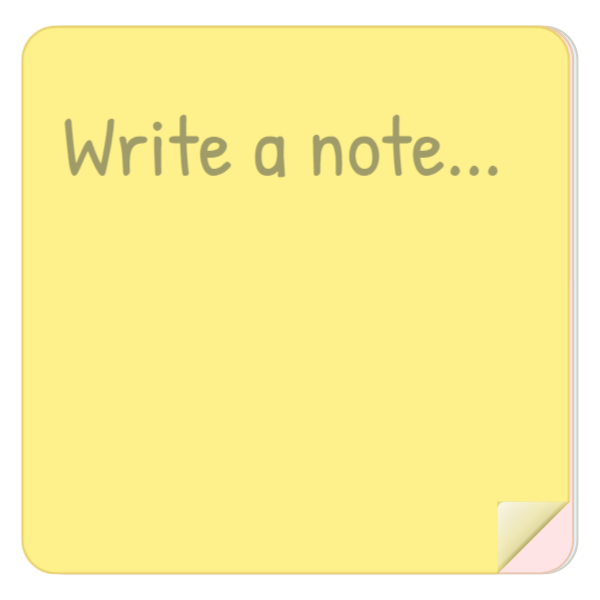
The Sticky Notes widget reintroduces the visceral joy of physical paper into your workspace: a tactile 3D sticky pad where you can jot thoughts instantly and physically tear off sheets when finished.
3D Peel Physics & Space-Maximizing Typography
Built with cutting-edge CSS 3D transforms and procedural canvas physics, the Sticky Notes widget simulates a real rainbow notepad cube with visible layered paper steps. Grabbing the bottom-right curled dog-ear corner lets you drag upward to peel the sheet with realistic paper curling and an authentic acoustic paper rip effect, revealing the next vibrant pastel sheet beneath it.
The text engine uses an authentic handwritten marker font paired with binary search auto-scaling: short three-word reminders expand to bold headline proportions, while longer notes scale gracefully to prevent awkward text cutoff. Fasteners include washi tape, metallic paperclips, red 3D pushpins, and ruled lines.
Four Ephemeral Scratchpad Protocols
The Live Meeting Braindump Dock
Park fleeting phone numbers, quick URLs, and raw brainstorm snippets on the sticky note during live Zoom calls without polluting your permanent project database schemas.
Physical 3D Peel-and-Tear Task Closure
Write your single most critical priority for the day on the top sheet. When the task is accomplished, drag the dog-ear corner and physically rip the sheet off for tangible emotional satisfaction.
The Pushpin Sprint Warning Anchor
Configure the note with a vibrant canary yellow paper tone, red 3D pushpin, and bold text. Embed it atop your sprint board to display urgent blocker alerts that cannot be overlooked.
Aesthetic Study Hub Personalization
Select pastel mint or lavender paper paired with washi tape fasteners to establish a warm, cozy personal study journal aesthetic that makes opening Notion an inviting ritual.
Architectural Breakdown: Dashboard Sticky Notes vs. Database Record Table
Database Tables & Records
Best for deep historical storage, relations, and structured records