The Allure of Mechanical Switches: Why Sound and Touch Anchor Attention
The global obsession with custom mechanical keyboards is not an accident of fashion: it is grounded in human sensory psychology. The tactile bump of a mechanical switch and the crisp acoustic clack of bottoming out provide immediate, unambiguous sensory feedback.
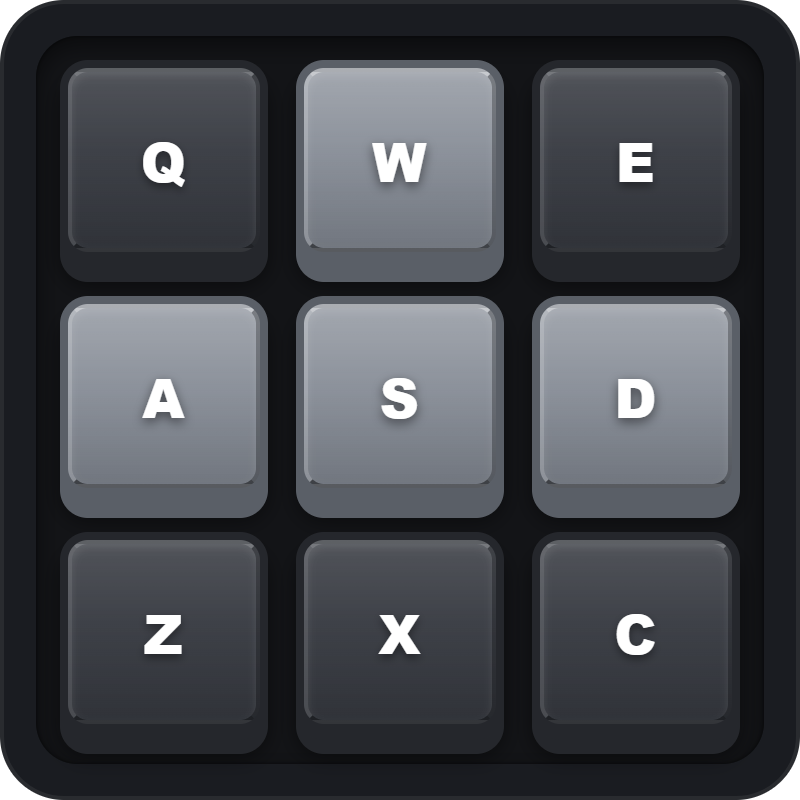
During demanding cognitive work (such as writing documentation, debugging software, or solving math problems), having an immediate tactile outlet for your fingers stimulates concentration and relieves stress. The Mechanical Keypad Fidget brings this sensory experience directly into your Notion workspace as a dedicated 9-key tactile fidget pad.
9-Key Matrix Engineering: Full Physical Keyboard Integration
The Mechanical Keypad Fidget features a 3x3 matrix of sculpted mechanical keycaps modeled after classic custom mechanical keyboards. You can click keycaps directly with your mouse or trigger them via your physical keyboard using the 3x3 cluster: Q, W, E, A, S, D, Z, X, C. Each key depression triggers realistic CSS 3D key travel and synthesized acoustic switch sound effects with zero latency via the Web Audio API.
Encased in a platform-standard 1px border with zero outer drop shadows, it serves as both an addictive fidget toy and an aesthetic homage to mechanical keyboard culture.
Four Tactile Cadence Protocols
The Thinking Cadence Tap
While pausing to think between paragraphs or code commits, tap rhythmic mechanical patterns on the 9-key pad. The acoustic rhythm stimulates cognitive pacing without distraction.
Physical Keyboard Finger Warmup
Use the QWE/ASD/ZXC key bindings to stretch and warm up your fingers before beginning long typing sessions, improving finger dexterity and reducing muscle tension.
Silent or Auditory Stress Dissipation
When feeling overwhelmed during intense work sprints, click through rapid multi-key combinations. The crisp audio clicks provide sensory relief and break obsessive worry loops.
Mechanical Desk Aesthetic Pairing
Pair the 9-key fidget pad alongside a digital clock or retro terminal widget. The mechanical keycaps create a tech-forward, craft-focused aesthetic on developer and engineering wikis.
Architectural Breakdown: Mechanical Keypad vs. Static Workspace
Complex Two-Way Sync Bots
OAuth credential tokens and schema dependency risks