The Mathematical Gap in Notion: Why STEM Planners Need Scientific Tools
Notion is an extraordinary platform for academic research, engineering documentation, and coursework wikis. However, when working through calculus problem sets, electrical engineering formulas, or statistical derivations, Notion's native capabilities hit a wall.
Students and researchers find themselves constantly picking up a physical scientific calculator or opening browser tabs with clunky graph tools. This fragmentation interrupts cognitive focus and slows down technical documentation.
The Scientific Calculator eliminates this barrier by providing a comprehensive, professional scientific computation suite directly inside your Notion notes.
Balanced Dual-Wing Architecture: High-Speed Mathematical Entry
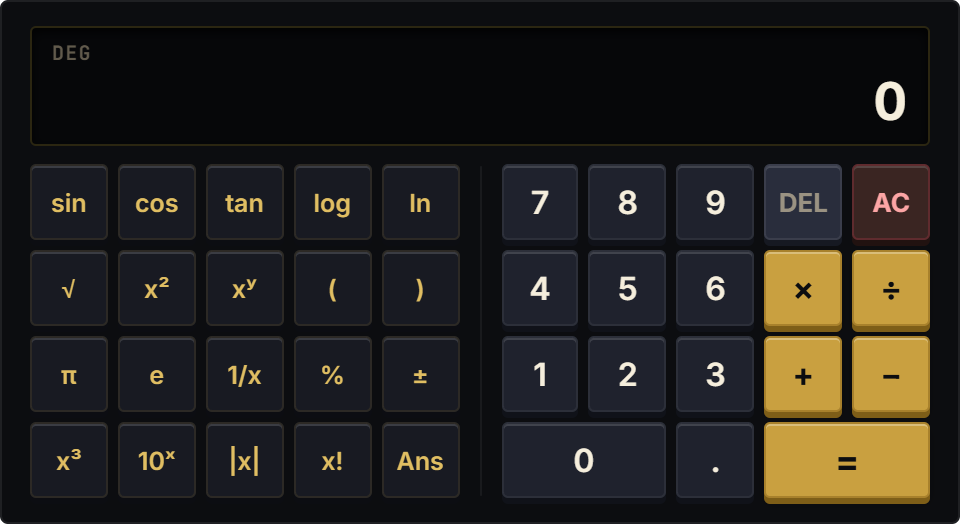
Unlike cluttered single-column scientific calculators that cram 40 tiny buttons together, the Scientific Calculator employs a balanced dual-wing architecture. The left wing houses dedicated STEM functions: trigonometry (sin, cos, tan, and inverses), logarithms (log, ln), powers and roots (x2, x3, xy, square root), factorials (x!), reciprocal (1/x), and mathematical constants (pi, e).
The right wing provides a spacious, high-speed numeric numpad with standard operators. A multi-line natural algebraic display presents your full formula expression above the live result, paired with instant DEG/RAD angle switching and a continuous Ans memory register.
Four STEM Research Protocols
Engineering Problem Set Derivation
Embed the Scientific Calculator directly alongside your engineering lab notebook. Compute trigonometric vectors and logarithmic decibel equations without leaving your study canvas.
Trigonometric DEG/RAD Angle Switching
Toggle between Degree mode for physics and surveying problems and Radian mode for pure calculus and wave frequency derivations with a single tap on the status pill.
Ans Register Chained Calculations
Use the Ans key to feed multi-digit intermediate results directly into subsequent equations, eliminating decimal rounding errors during complex multi-step physics solutions.
Widescreen Study Hub Integration
Position the dual-wing calculator across the header of your course syllabus or research thesis dashboard. The horizontal aspect ratio creates an impressive, professional study cockpit.
Architectural Breakdown: Scientific Calculator vs. Database Formula Table
Formula Properties & Rollups
Requires custom property formulas and rollup configuration