The Dread of the Unverified Tally: Why Commercial Math Demands Auditing
When bookkeeping invoices, expense receipts, or quarterly budgets, a single misplaced digit invalidates the entire calculation. On standard pocket calculators, adding 35 continuous line items is an anxiety-inducing exercise: if you lose concentration on item 28, you have no way to verify your progress without wiping the register and starting over.
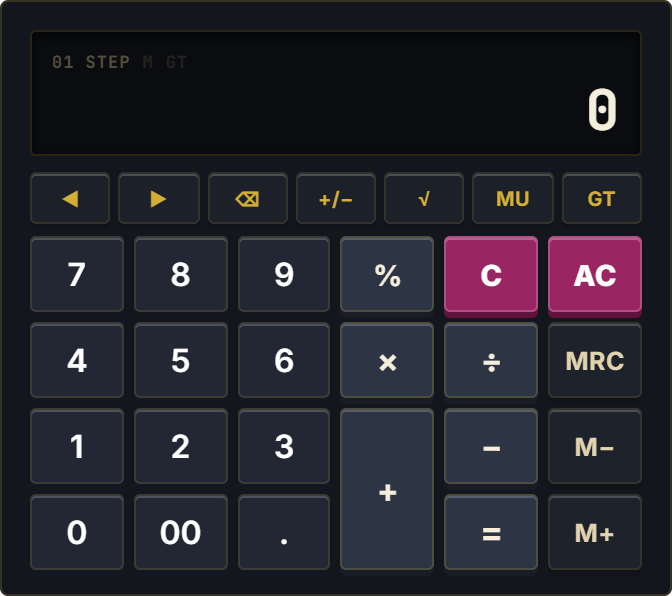
Commercial desk calculators solve this through dedicated multi-step audit memory. The Desktop Calculator brings the beloved Casio MJ-12D commercial office architecture directly into your Notion workspace, combining a full step audit trail with Grand Total accumulation and commercial mark-up tools.
Authentic 6-Column Commercial Ergonomics: Built for Rapid Bookkeeping
Engineered specifically for business professionals and accountants, the Desktop Calculator features a 6-column physical layout with dedicated double-zero [00] for rapid currency entry, an oversized double-height [+] key for blind touch operation, and a 7-button auxiliary function strip. The built-in step review buffer records every addition, subtraction, multiplication, and division step.
Using the dedicated ◀ and ▶ review buttons, you can inspect each line item in your audit sequence. Supported by Grand Total (GT) accumulation, three-key memory registers (M+, M-, MRC), and commercial Mark-Up (MU) calculation, it delivers serious business arithmetic without desktop clutter.
Four Commercial Bookkeeping Protocols
The Step-by-Step Invoice Verification
After inputting a long stack of invoice line items, press the review buttons to step backward through every single entry. Verify numbers against paper receipts with 100% confidence before committing the final total.
Grand Total Multi-Batch Accumulation
Tally several distinct budget sub-categories sequentially. Pressing GT instantly sums the accumulated grand total across all batches without requiring manual memory register notation.
Commercial Mark-Up (MU) Valuation
Use the MU key to quickly calculate selling prices based on target gross profit margins or determine sales tax additions on wholesale purchases in a single operation.
Side-by-Side Accounting Hub Docking
Place the Desktop Calculator directly alongside your Notion bookkeeping tables and accounts payable databases. The generous 6-column interface creates an authentic executive office workstation.
Architectural Breakdown: Desktop Calculator vs. Database Formula Table
Formula Properties & Rollups
Requires custom property formulas and rollup configuration