The Illusion of Infinite Tomorrow: Why Unanchored Goals Evaporate
In his seminal philosophical essay 'De Brevitate Vitae' (On the Shortness of Life), Roman Stoic philosopher Seneca observed that humanity does not suffer from having too little time, but rather from squandering vast quantities of it under the tranquil delusion that tomorrow is guaranteed. We delay our most meaningful creative and professional endeavors because the calendar appears endlessly renewable.
Modern digital calendar tools inadvertently reinforce this dangerous delusion. When you view a standard Google Calendar or Notion monthly database, you are presented with pristine, empty geometric squares that look orderly and limitless. Because dates are displayed as static text labels rather than depleting reservoirs, your brain suffers from Temporal Discounting, treating future deadlines as distant and inconsequential.
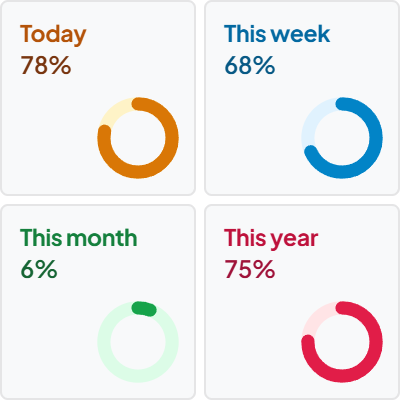
The Life Progress Tracker widget dismantles this illusion by rendering time as dynamic, depleting percentage bars. When you visually witness that 73% of the current quarter has already evaporated while your key objectives remain at 20%, intellectual procrastination transforms into immediate, productive urgency.
Multi-Horizon Calibration: Bridging the Day, Quarter, and Year
A common trap among ambitious Notion builders is horizon myopia: focusing exclusively on today's granular to-do list while losing sight of strategic quarterly milestones, or conversely, obsessing over multi-year vision boards while drifting aimlessly through Tuesday afternoon.
In their revolutionary execution framework 'The 12-Week Year', Brian Moran and Michael Lennington demonstrate that annual goal-setting leads to the 'year-end sprint fallacy,' where teams waste the first eight months of the year assuming they have ample time to catch up. By condensing the accountability horizon into a 12-week sprint, every week becomes the equivalent of a month, and every day holds immense strategic significance.
The Life Progress Tracker embeds this exact multi-horizon discipline directly into your Notion workspace. By presenting synchronized progress meters for the active Day, Week, Month, Quarter, and Year, you maintain continuous calibration between immediate tactical execution and macro life trajectory.
4 Frameworks for Temporal Mastery in Notion
The 12-Week Year Quarter Reset
Treat each fiscal or calendar quarter as an independent, closed campaign. Align your Notion project databases directly with the Quarter Progress meter. When the meter crosses 75%, initiate a scope freeze: eliminate non-critical backlog tasks and channel all cognitive bandwidth into completing active commitments.
The Sunday Temporal Audit
During your weekly Sunday Notion review, compare your completed deliverables against the elapsed Week % and Month % meters. Did your output match the pace of time consumed? This simple visual cross-examination eliminates self-deception and ensures immediate course correction.
Memento Mori Life Calibration
Toggle the widget's Life Expectancy meter based on actuarial tables or your target longevity. Seeing that 38% or 52% of your total estimated lifespan has elapsed provides sobering perspective during petty workplace conflicts, instantly clarifying what truly matters.
The Midday Runway Check
Inspect the Day % meter at 1:00 PM (typically around 54% of waking hours). If the morning slipped away to administrative trivia, use the remaining 46% of the visual day runway to protect a single 90-minute block for your most critical needle-moving task.
Architectural Breakdown: Visual Life Meter vs. Notion Date Formulas
Why dedicated visual progress widgets outperform complex database date formulas for time management:
Formula Properties & Rollups
Requires custom property formulas and rollup configuration