The Friction Trap: Why Most Notion Habit Databases Fail
If you have ever downloaded a complex Notion "Life OS" template with 40-column relational databases, rollup formulas, and daily checkbox archives, you know the familiar cycle: high excitement in week one, increasing resistance by week two, and total abandonment by week three.
The reason isn't a lack of discipline; it is cognitive friction. Every time you open Notion to log a completed habit, navigating through nested page trees, opening database modals, and waiting for heavy formulas to compute creates micro-friction. In behavioral psychology, an action will not become habitual if the friction required to record it exceeds the perceived reward of doing it.
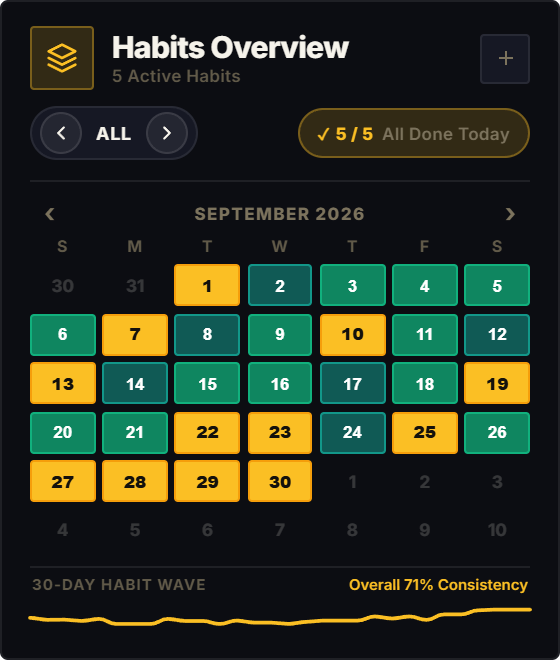
The Habit Tracker widget solves the friction problem by eliminating database overhead entirely. You don't open pages, create daily rows, or configure properties. You tap once directly on today's calendar date, the cell deepens in hue, and your daily routine is locked in under two seconds.
The Science of Visual Heatmaps: The Dopamine Feedback Loop
In James Clear's bestselling book Atomic Habits, the fourth law of behavior change is simple: Make it satisfying. The human brain evolved to prioritize immediate feedback over delayed abstract rewards.
Traditional checkboxes are binary and forgettable. Once checked, they offer no cumulative visual momentum. In contrast, visual heatmaps, popularized by software developer commit graphs, utilize color intensity gradients. When you see your monthly calendar grid progressively transition from faint outlines to deep, glowing tiles, your brain receives visual proof of your consistency.
This visual progress meter triggers an immediate neurological dopamine response. You aren't just logging an isolated task; you are visually filling a canvas that reflects your evolving identity.
4 Proven Habit Methods to Supercharge Your Notion Workspace
Habit Stacking (BJ Fogg & James Clear)
Never attempt to build a new habit in a vacuum. Anchor your new routine to an existing, established daily anchor. Use the universal formula: "After [CURRENT HABIT], I will [NEW HABIT] in my Notion Habit Tracker." For example: "After I brew my morning espresso, I will tap my Reading and Meditation cells." Stacking leverages existing neural pathways so you never have to remember when to log.
The Two-Minute Rule & Keystone Habits
When starting a new habit, scale down the daily requirement until it takes under two minutes. Want to read more? Your habit target is 2 pages, not an hour. Want to workout? Your target is putting on running shoes. Once you show up and tap your widget, the barrier to continuing vanishes. Focus on one Keystone Habit, the single anchor (like sleep or morning exercise) that naturally improves your diet, focus, and energy throughout the entire day.
The "Never Miss Twice" Philosophy
Missing one day is an accident; missing two days is the start of a new, negative habit. Unforeseen travel, illness, or late nights will inevitably disrupt your streak. The goal of a high-performance Notion dashboard is not perfection, but resilience. If you miss a Tuesday, your sole mission on Wednesday is to log that cell, retaining your habit identity before momentum collapses.
Elastic Habits: Mini, Plus, and Elite Goals
Rigid all-or-nothing goals are fragile. Elastic habits provide 3 tiers of success: Mini (1x), Plus (2x), and Elite (3x+). The Habit Tracker widget supports multi-target cycling directly on each calendar day. On busy days, tap once for a Mini win. On peak energy days, tap 3 times for an Elite deep-colored cell. Consistency is preserved every single day regardless of your energy levels.
Architectural Breakdown: Dashboard Embed vs. Raw Database View
Why pairing a dedicated visual widget with your Notion templates creates the ideal daily workflow:
Database Tables & Records
Best for deep historical storage, relations, and structured records