The Power of the Daily Anchor: Grounding Today in Sharp Relief
In modern knowledge work, days frequently blur together into a continuous stream of digital backlog tasks. Without a strong temporal anchor, you open your computer on Wednesday morning feeling as though Monday never ended.
Traditional analog offices relied on the physical tear-off desk calendar: a bold day number, day of the week, and month that made each day feel distinct and intentional.
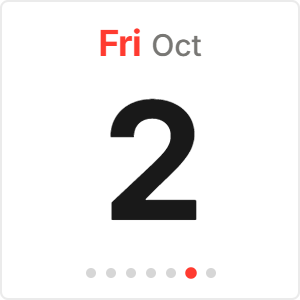
The Daily Date Card brings that tactile desk calendar experience into your digital Notion workspace, celebrating today as a focused, standalone block of time.
Bold Typography and Peripheral Date Visibility
Designed with large-format numeral display, the Daily Date Card allows you to read today's date from across the room.
The bold day number is paired with an elegant secondary weekday pill and month badge, establishing an immediate visual anchor on your daily dashboard.
The widget requires zero ongoing maintenance: it synchronizes with your device's system clock and advances automatically at midnight.
4 Daily Focus Strategies for Notion
The Morning Launchpad Anchor
Place the Daily Date Card at the top-left of your morning dashboard. Orient yourself to today's date before touching your task list.
The Journal Entry Timestamp
Embed the card above your daily journal template to give your daily reflection entries an authentic visual timestamp.
The Desk Station Combo
Stack the Daily Date Card directly above a flip clock or digital clock widget for a complete modern desk station.
The Single-Day Commitment Rule
Let the large date remind you: today is the only day you can influence. Concentrate your energy entirely on today's needle-moving priorities.
Architectural Breakdown: Daily Date Card vs. Notion Date Properties
Why large-format visual date cards deliver stronger daily motivation than small database timestamps:
Database Tables & Records
Best for deep historical storage, relations, and structured records