The Remote Work Friction: Conquering Timezone Mental Math
In modern distributed teams, asynchronous collaboration is standard. However, knowing whether your engineering partner in Tokyo is awake, your London client is finishing lunch, or your San Francisco founder is starting their day often requires exhausting mental gymnastics.
Constant manual timezone conversions (+5 hours, -8 hours, daylight saving discrepancies) induce cognitive fatigue and inevitably cause missed meetings or misplaced messages.
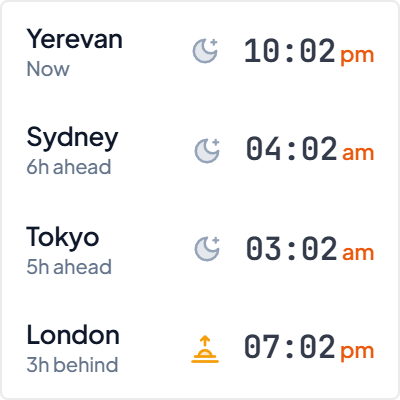
The World Clock Digital displays multiple international city cards on a unified visual matrix, complete with explicit relative day indicators (+1 day / -1 day) and live local hours.
Executive Dashboard Ergonomics: High-Density Team Clocks
Formatted as a high-density horizontal strip or compact vertical stack, the widget fits comfortably across wide project hubs or slim sidebar rails without monopolizing space.
Clear typographic hierarchy highlights the city name, active hour, and whether the location is currently within business hours or late night.
Built-in automatic Daylight Saving Time (DST) calculations ensure you never have to manually adjust time offsets when international clocks shift.
4 Global Team Management Frameworks for Notion
The Overlap Window Matrix
Align your primary team cities to quickly identify the 2 to 3 hour golden overlap window for live meetings and synchronous sprint demos.
The Client Comms Header
Embed dedicated client timezone clocks above project briefs to ensure notifications and status updates are never sent during their midnight hours.
The Asynchronous Hand-off Rail
Position city cards alongside daily task hand-off databases for seamless shift transfers between European, Asian, and American contributors.
The Financial Hub Trio
Monitor New York, London, and Tokyo simultaneously for global market open and close awareness in trading and investment workspaces.
Architectural Breakdown: Multi-City Digital Widget vs. Manual Timezone Spreadsheets
Why an automated multi-timezone widget eliminates scheduling errors compared to static tables:
Database Tables & Records
Best for deep historical storage, relations, and structured records