The International War Room: Spatial Geometry Across Continents
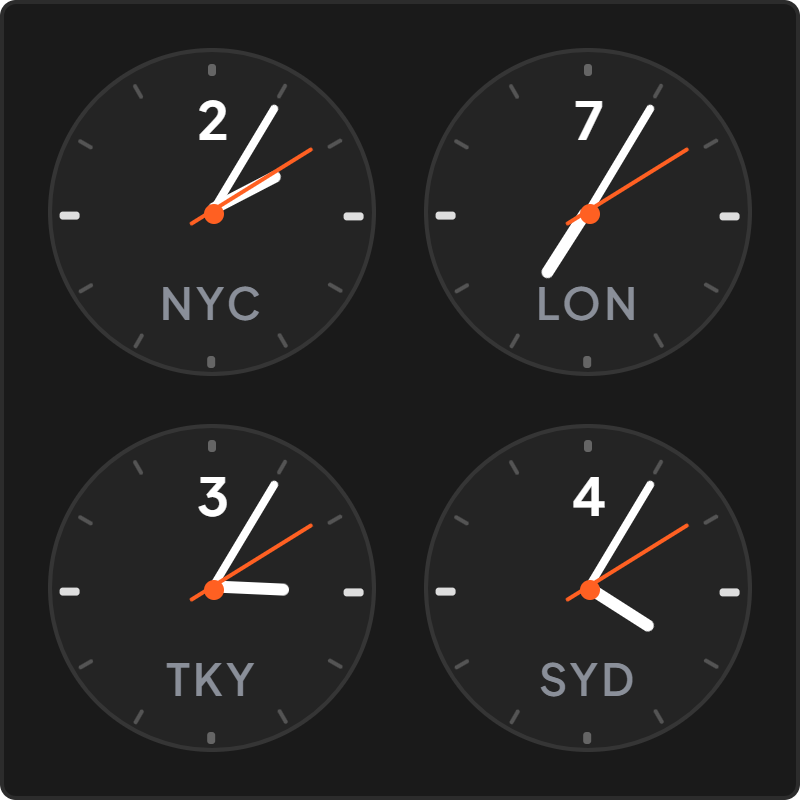
For decades, international newsrooms, trading floors, and executive command centers have relied on physical rows of analog wall clocks. The reasoning is rooted in spatial perception: a single glance across multiple dials reveals the global rhythm through the angle of the clock hands.
You do not need to read small numbers; your peripheral vision instantly registers that New York is at 9 o'clock morning sprint, London is at 2 o'clock afternoon peak, and Tokyo is resting at 11 o'clock night.
Our Multi-Dial World Clock brings that distinguished executive war-room aesthetic into your personal Notion command center with crisp, synchronized horological dials.
Multi-Dial Architecture: Balance and Typographic Restraint
Each dial is balanced with mathematical symmetry: clean city labels beneath each clock face, delicate hour indices, and synchronized hand sweeps.
The multi-dial layout dynamically reflows: on wide desktop dashboards, dials align in a stately horizontal row; on narrow columns, they stack into an elegant vertical tower.
High-DPI vector rendering guarantees pristine sharpness without jagged edges, regardless of screen resolution or browser zoom.
4 Executive Multi-Timezone Rules for Notion
The Tri-Continental Hub
Standardize on New York, London, and Tokyo or Singapore to keep the world's primary commercial pulses visible on your executive dashboard.
The Distributed Leadership Header
Place the multi-dial clock across the top of your Notion team directory page to ground team context before scheduling calls.
The Travel Runway Dashboard
Set your home timezone on the left dial and your destination timezone on the right dial before international travel to ease jetlag adjustment.
The High-Contrast Monochrome Aesthetic
Choose Obsidian Noir with white dials and hands for maximum readability during evening strategy sessions.
Architectural Breakdown: Multi-Dial Analog Widget vs. Multiple Embeds
Why a single unified multi-dial clock delivers a cleaner workspace than embedding several separate widgets:
Database Tables & Records
Best for deep historical storage, relations, and structured records