The Technical Interview Gauntlet: Taming Algorithmic Prep Anxiety
Preparing for technical coding interviews at top software companies is an intensive endurance test involving hundreds of data structures and algorithms challenges.
Candidates frequently struggle with problem distribution: grinding too many Easy problems gives a false sense of security, while getting stuck on Hard dynamic programming problems destroys momentum.
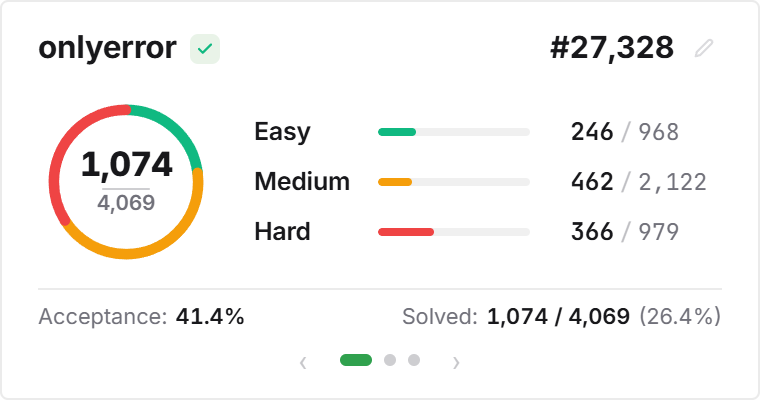
The LeetCode Stats Card visualizes your preparation balance across Easy, Medium, and Hard tiers, ensuring you build the well-rounded algorithmic foundation needed for real technical interviews.
The Curated Study Station: Notion as Your LeetCode Command Center
Effective interview preparation requires pairing problem-solving with rigorous notes: time and space complexity trade-offs, edge cases, and algorithmic patterns (Sliding Window, Two Pointers, Backtracking, DFS/BFS).
Embedding your live LeetCode card directly above your Blind 75, NeetCode 150, or Grind 75 database creates a unified study command post where practice and documentation reinforce each other.
Features interactive tabbed views: switch between your total solved problem breakdown, 52-week activity calendar, and contest ranking rating with one click.
4 Algorithmic Preparation Strategies for Notion
The Balanced Tier Ratio Rule
Maintain a healthy 2:3:1 ratio (20% Easy warmup, 60% Medium interview core, 20% Hard stretch) visible on the interactive tier breakdown ring.
The Daily Consistency Chain
Use the 52-week LeetCode submission heatmap to ensure you solve at least one algorithmic problem every calendar day without streak gaps.
The Interview Countdown Command Hub
Position the stats card next to your target interview date countdown for grounded urgency during the final 30-day revision window.
The Pattern Note Database Link
Link each solved problem directly into a Notion database detailing pattern tags and time-complexity trade-offs for active recall review.
Architectural Breakdown: Live LeetCode Card vs. Manual Checklists
Why live LeetCode API synchronization outperforms manual spreadsheet tracking:
Third-Party Apps & Tabs
Context switching, external logins, and notifications