The Remote Commerce Gap: Navigating Volatile Foreign Exchange
In today's global digital economy, digital nomads, international freelancers, and cross-border agencies invoice clients in USD, pay developers in EUR, and manage living expenses in local currencies.
Relying on static conversion formulas inside Notion databases leads to stale numbers that fail to reflect currency devaluations, central bank interest rate decisions, or market shifts.
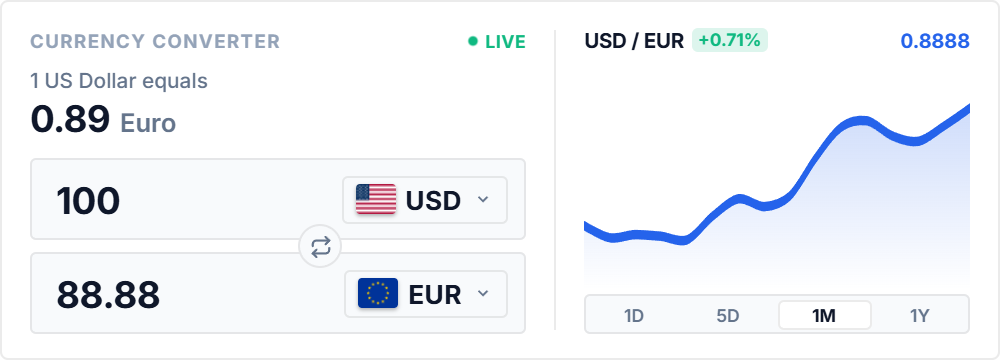
The Currency Converter widget connects your Notion pages directly to live institutional mid-market exchange rates, ensuring your contract estimates and travel budgets remain accurate to the cent.
Historical Volatility Sparklines: Timing International Wire Transfers
Converting international revenue during market dips can cost percentage points in foreign exchange drag.
Featuring interactive 1-day, 5-day, 1-month, and 1-year SVG trend sparklines with mouse-tracking value scrubbers, the widget allows you to evaluate whether a currency pair is trading near 52-week highs or lows.
Built-in local caching guarantees that even when working offline on airplanes or with unstable Wi-Fi, the converter serves the most recent rates without breaking.
4 International Financial Strategies for Notion
The Client Invoicing Rate Anchor
Embed alongside proposal databases to calculate exact multi-currency pricing before sending international client contracts.
The Digital Nomad Cost-of-Living Rail
Position in your relocation hub to monitor local purchasing power parity against your home earning currency.
The Wire Transfer Timing Rule
Inspect the 1M and 1Y sparkline trends to time international lump-sum business transfers during favorable swings.
The Contractor Payout Converter
Embed above global team payroll tables to verify exact converted payouts before issuing monthly wires.
Architectural Breakdown: Live Currency Widget vs. Static Notion Formulas
Why automated mid-market rate feeds outperform static database conversion formulas:
Formula Properties & Rollups
Requires custom property formulas and rollup configuration