The Subscription Creep Trap: How Small Dues Accumulate
Modern research shows that the average working professional underestimates their monthly subscription commitments by over $150. Streaming services, software licenses, fitness memberships, and cloud storage silently auto-renew on credit cards.
Because recurring payments hit accounts on staggered days across the month, you rarely experience the cumulative psychological weight of your overhead in a single moment. Small charges blend into bank statements unnoticed.
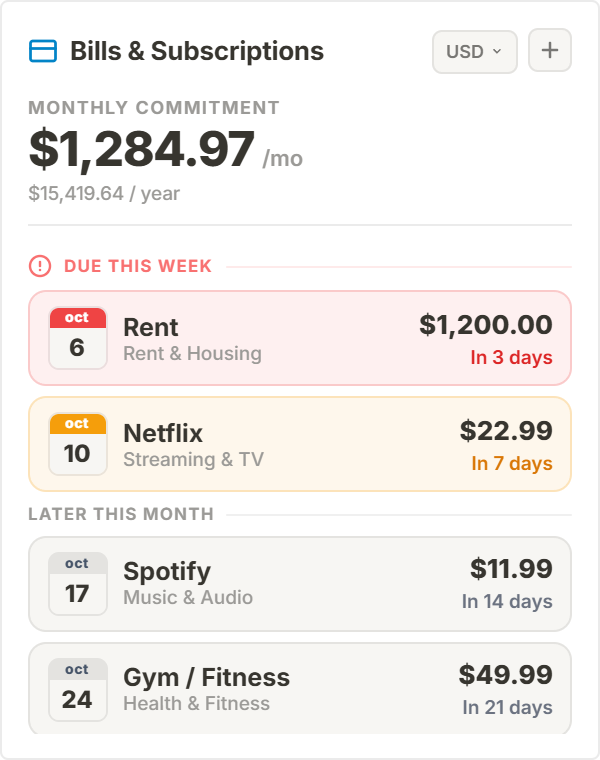
The Bills & Subscriptions Tracker aggregates all recurring commitments onto your primary Notion dashboard, computing your true annual burn rate and highlighting upcoming due dates before bank accounts are debited.
Temporal Countdown Ergonomics: Eliminating Late Fees
Banking applications require multi-factor authentication, slow loading screens, and nested menu navigation just to check when a bill is due.
This widget features color-coded urgency countdown badges (e.g. 'Due in 2 days', 'Due tomorrow') that catch your peripheral vision during daily workspace planning.
Runs 100% locally in your browser storage: zero bank account linking, zero passwords exposed, and complete financial privacy.
4 Cash Flow Governance Strategies for Notion
The Quarterly Subscription Audit
Sort subscriptions by annual burn rate every quarter to cancel forgotten software licenses before automatic yearly renewals.
The Due-Date Staggering Protocol
Align major billing due dates immediately following your primary monthly salary or client retainer deposit dates.
The Fixed Overhead Callout Anchor
Position the tracker in the financial planning rail of your Life OS next to monthly income targets and budget goals.
The Low-Contrast Midnight Mode
Select the Obsidian Noir palette to blend seamlessly with dark Notion workspaces during evening financial reviews.
Architectural Breakdown: Bills & Subscriptions Tracker vs. Banking Apps & Manual Tables
Why dedicated visual subscription widgets provide greater control than manual spreadsheets:
Third-Party Apps & Tabs
Context switching, external logins, and notifications