The Weekly Horizon Gap: Moving Beyond Day-to-Day Weather Reactive Habits
Effective weekly planning requires synoptic visibility. When project managers, freelancers, and students structure their weekly sprint in Notion, they schedule deadlines, client presentations, field assignments, and travel days across a multi-day canvas.
Yet most weather widgets only provide today's immediate snapshot. Lacking multi-day foresight, individuals make poor scheduling decisions: booking photography shoots on rainy afternoons, scheduling heavy concentration sessions during pleasant mild days, or failing to prepare for mid-week temperature drops.
The 5-Day Weather Card bridges this gap by presenting a cohesive 5-day synoptic weather horizon, enabling you to align your weekly task load with atmospheric reality.
Pillar Architecture & Visual Rhythm: Sits Seamlessly in Weekly Hubs
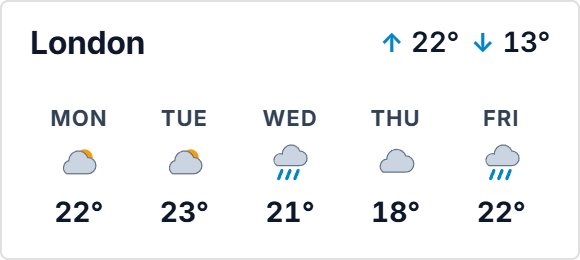
The 5-Day Weather Card organizes meteorological data into five elegant vertical columns, one for each consecutive day. Each pillar presents the day abbreviation, an expressive vector condition icon, expected high and low temperatures, and a visual range bar.
This structured vertical rhythm mirrors the multi-column layout of Notion weekly agenda boards and sprint kanbans. Built with responsive SVG architecture, the card maintains proportional spacing whether embedded in a medium dashboard container or expanded across a wide planning canvas.
The clean 1px perimeter border and absence of distracting drop shadows ensure seamless visual unity with Notion's native cards and database blocks.
Four Weekly Forecast Protocols
The Sunday Sprint Weather Audit
During your Sunday weekly planning ritual, review the 5-Day Weather Card alongside your project calendar. Allocate outdoor shoots, client lunches, and commutes to mild, clear days, reserving stormy days for focused deep-work sprints.
Thermal Delta & Energy Management
Track the spread between daily highs and lows. Sudden drops in atmospheric pressure and temperature frequently trigger physical fatigue and migraine flare-ups; plan lighter task loads during major meteorological shifts.
Weekly Kanban Header Docking
Place the 5-day weather card directly above your 5-column Monday-through-Friday Notion task board. Aligning the days of the week visually between the weather card and your task columns creates intuitive spatial harmony.
Dual-Contrast Workspace Balancing
Pair the 5-Day Weather Card in Warm Cream or Notion Light with your light-mode daytime dashboard, switching to Obsidian Noir for evening review. The crisp contrast ensures readability from across your desk.
Architectural Breakdown: Dashboard Weather Embed vs. Raw Database View
Database Tables & Records
Best for deep historical storage, relations, and structured records